Categoría: Apache
-

Vaciar cache de mod_pagespeed de google
Una forma rápida de tunear nuestro servidor y ganar algo de velocidad en nuestros sites es usar mod_pagespeed de google que proporciona un sistema de compresión básico de css y js, así como una optimización de gestión en las imágenes, realmente sí se nota y no es complicado de instalar. Una vez instalado, el problema…
-
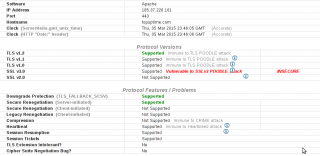
apache2 mod_ssl poodle atack fix
El año pasado me alegré un poco de no trabajar como adminstrador de sistemas, el continuo escándolo de fallos gordos de seguridad, me hubiera subido la tensión aún más 😀 Uno de los fallos de seguridad fué el llamado ‘POODLE‘ destapado por gente Google, del que llevaban conociendo us existencia bastante tiempo; en resumen permite…
-
redirige tu dominio a www
Cuando tienes un site un poquito más grande, se suele jugar con los nombres de hosts y puede ser que la ip donde esté tu domino.ltd no tenga el mismo contenido que www.domino.tld para redirigir todo el tráfico a www se puede hacer de una manera muy muy simple usando mod_rewrite en .htaccess [shell] RewriteEngine…
-
redirigir HTTP a HTTPS
Receta rápida para redirigir todo el tráfico HTTP a HTTPS usando mod_rewrite de Apache <ifModule mod_rewrite.c> RewriteEngine On RewriteCond %{HTTPS} off RewriteRule (.*) https://%{HTTP_HOST}%{REQUEST_URI} </ifModule>
-
Fallo grave de seguridad en Plesk mod_php
Nos llega información acerda de una fallo de seguridad en Plesk: «SECURITY ADVISORY: Parallels Plesk Panel 9.x, 10.x, 11.x – Privilege Escalation Vulnerability Parallels Customer, Please read this message in its entirety and take the recommended actions. Situation Parallels Plesk Panel privilege escalation vulnerabilities have been discovered and are described in VU#310500 and CVE-2013-0132, CVE-2013-0133…
-
cómo instalar eAccelerator para acelerar tu servidor apache
Últimamente tratamos con bastantes tiendas en prestashop y una de las formas de mejorar el rendimiento de las tiendas es usando eaccelerator. Es muy fácil de instalar si no tenemos el paquete en nuestra distribución, el único inconveniente es que tienes que recompilar cada vez que instales una versión nueva de php. # instalamos dependencias…
-
redigir hostnames en apache con mod_rewrite
Hay casos ( por ejemplo en Prestashop 1.3 ) que es necesario que la navegación se redirija de hostingaldescubierto.com a www.hostingaldescubierto.com Una forma fácil de solucionar esto sería agregar al .htaccess las siguientes lineas: RewriteCond %{HTTPS} off RewriteCond %{HTTP_HOST} !^www.hostingaldescubierto.com [NC] RewriteRule ^(.*)$ http://www.hostingaldescubierto.com/$1 [L,R=301] RewriteCond %{HTTPS} on RewriteCond %{HTTP_HOST} !^www.hostingaldescubierto.com [NC] RewriteRule ^(.*)$ https://www.hostingaldescubierto.com/$1…
-
Bloqueando los ataques más básicos
En las tareas rutinarias de revisión de los logs, podemos encontrar intentos de acceso por fuerza bruta en el servicio de correo, ssh, ftp, y logs en apache de los scanners más comunes buscando por rutas concretas de foros phpbb, mysqladmin, etc… Una solución muy cómoda y rápida para bloquear los ataques más básicos es…
-
SVN : Error detected while processing /usr/share/vim/vimrc
Otra de subversion : [shell] svn: Can’t open file ‘/var/lib/svn/hostingaldescubierto.com/db/txn-current-lock’: Permission denied [/shell] Esto es por que no hay permisos para modificar los ficheros, seguramente el propietario es root , pero estamos usando autenticación por apache, así le tenemos que dar permisos a www-data para que pueda commitear . [shell] chown -R www-data.www-data /var/lib/svn/hostingaldescubierto.com/ [/shell]
-
[Plesk] Parallels Plesk Panel 10: Cambiar el puerto apache
Tan sólo llevamos unos minutos revisando documentación y nos encontramos con esta nueva característica: cambiar el puerto de apache: http://download1.parallels.com/Plesk/PP10/10.0.1/Doc/en-US/online/plesk-apache-configuration-guide/index.htm La primera impresión al leer la documentación es que Plesk 10 aún está en beta, pero ha sido liberada, y será madurada en las siguiente releases. Hay una característica medianamente aceptable y es que ahora…